Tuesday, November 29, 2005

Linksys and wireless networking fun.

So I just spent essentially the last two days configuring our new wireless network. I decided on Linksys hardware because it is cheap and has a reasonable reputation. The router lived up to the reputation but both of cards were a problem.

My laptop runs Debian Linux. This is where the trouble started. I checked the compatibility list before I bought the hardware and the card was listed so I was happy. Of course it was listed, they're all listed. The only problem is that most of them have a blank space in the table where the driver name should be. Oops and arrrrgh. At this point I was worried but a little frantic googling yielded ndiswrapper.

My normal process for setting up new software that I don't fully understand is to find as many different sets of instructions as I can and try to follow them all simultaneously. This approach usually doesn't work too well but this time it was a success. Thank-you ndiswrapper!

The other computer runs win98 but at least it's not ME. To me this is like saying, "I fell from a third storey window but at least I didn't land on a spike!". I have been spoiled by Debian and, dare I say it, XP. I had forgotten what it was like to have to repeat all the steps until every mouse click and keyboard entry is perfectly executed.

The installation seemed to be going well until the configuration utility crashed. The configuration utility would only run once; after a new installation and would always crash right after I entered the passphrase. So I couldn't get it out of infrastructure mode (static IP). Reluctantly I reverted to the classic uninstall, reinstall cycle. The first uninstall deleted the windows dhcp libraries. After a number of failed installations and some failed un-installations, I found the correct steps to make it work:
  1. Uninstall the drivers and config utility, be thorough.
  2. Re-install the drivers causing the dhcp libraries to be re-installed (from my dusty old win98 CD).
  3. Reboot and quit the config utility before it has chance to crash.
  4. Change the advanced settings for the card in the windows network dialog to Ad Hoc mode and reboot again.
  5. The config utility will run again. Let it pick up the network, enter the passphrase.
  6. Hit OK, get a success message and quit as quickly as possible.

It worked and I have subsequenly enabled the security settings and it all still works.

Tuesday, November 08, 2005

IFS Designer Update and Tutorial

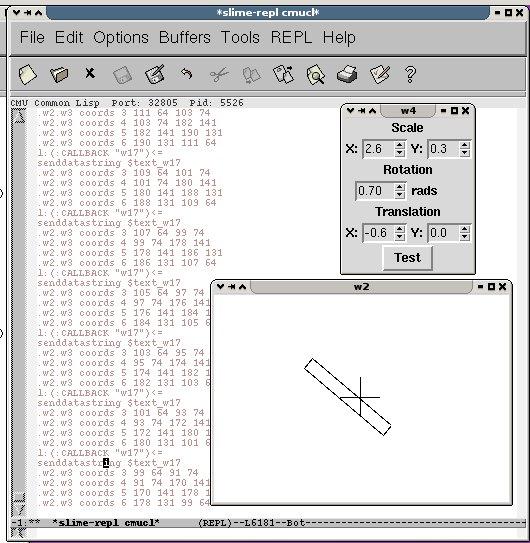
I've made some more updates to my IFS Designer. I think it's actually quite usable now as most of the changes are GUI changes. The main window is still just a mess of buttons but I'm just waiting until I've got enough functions to warant a menu. If I made one now it'd be save, load, exit and draw and that's just not worth my trouble putting a menu together and it's not worth your trouble to make the extra click. Anyway, here's the list of changes I did make:
  • There is now a README that contains a short tutorial. If you don't know what an IFS fractal is this won't tell you but it will tell you how to make one and a pretty one too!
  • Added a CHANGELOG, mostly to prevent me from claiming non-new features as new, also there's a (mercifully short) bug list.
  • Integrated the event loops for Ltk and cl-sdl to allow live update of IFS display. This was simply a case of telling the cl-sdl event loop to run ltk:process-events when it's idling. I initially felt a bit wrong about this. I thought Ltk should be in charge, not some subsidiary window that's only there to show the pretties. I like cl-sdl too but I wouldn't want to build a GUI with it! I got over myself when I realised that not only was it the path of least resistance but that the cl-sdl event loop spent most of it's time idling anway.
  • Separated the cl-sdl display window from the IFS class hierarchy so now it displays a given IFS rather than displaying itself. This is a bit of a no-brainer, the interface is not that which it controls/displays. Sometimes it's just easier (to start with) to lump it all together and then seperate it out once you've decided which bits should go where. I guess this design method is similar to the oft cited optimisation analogy of crystalisation. You start out using lists and no type information at all. Then as you find the optimisation bottlenecks you add the necessary declarations that allow a fast program to crystalize out of the mailliable, but slower un-typed lisp. Similarly with design you start out with lots of interconnected objects then as the desired functionality becomes clearer you can start to pull them appart until you have a nice clean, modular design.
  • Made cl-sdl display window exitable by changing a slot value. Now who's in control! :)
  • Closed windows now re-open automatically. When you close an Ltk window it is just hidden by default so it only needs to be made visible again not re-created; which is nice.
There's lots of extra code in the archive that's getting ready to implement exciting new features but not yet. It will give you an idea of what's on my mind though.

There's a new version of the matrix library that you'll also have to get for this new version to work.

Monday, October 31, 2005

IFS Designer Update

I just uploaded a new version of my IFS designer. The changes are:
  • Added save and load functions
  • Added some simple examples (sierpinski triangle, fern, square and square spiral)
  • You can now use the left mouse button to move (translate) the view for both the transform display window and the fractal window.
  • You can now use the right mouse button to zoom (scale) the view for both the transform display window and the fractal window.
  • Fixed an evil little bug with the transform selector that was causing IFS performance to be very poor. It should select the transforms at random weighted by the size of the determinant but instead it picked the last transform much more often. This caused the point density of the fractals to be all wrong but the fractals were still mostly the right shape. I love resillient algorithms, especially ones that can survive me!
The next issue I have to tackle is that the cl-sdl based fractal viewer (the rest is ltk) has it's own event loop so you have to quit it (hit q) before you can go back to editing the transforms. I guess I'll have to mesh the ltk and cl-sdl event loops together.

Friday, October 28, 2005

IFS Designer first Release


I have just made the first release of my IFS Designer program.
The new features are:
  • Generates IFS Fractals in an SDL window. I realize that this is the whole point but since it's the first release even core functionality is a new feature!
  • SDL window allows you to zoom into the fractal you've created. This is useful because many of the nice familiar fractals are contained in a unit square so without zooming they'd just be a dot and where's the fun in that?
  • The interface allows you to easily select and manipulate transformations that make up the fractal. Thanks Ltk!
  • Choose the number of points you draw for the fractal so you can get almost instant results or dense images.
  • LLGPL License for both the IFS Designer and the matrix library

Of course feedback is always welcome.

Monday, October 24, 2005

IFS Designer Project starts to take shape.


I've been putting in some work on my new and interesting project. It's a fun little app developed in common lisp with Ltk (a lisp interface into tcl/tk) in slime. It allow you to design 2D IFS fractals by graphically manipulating the transforms that comprise them.
I really like the IFS algorithm because it's just sooo simple:
  1. Take a number of transformations (scale, rotate, translate). Three is enough to produce a nice standard fern-like fractal.
  2. Starting at the origin, apply the transforms in a random order (weighted by the size (determinant) of the transformation matrix)
  3. After about 100-200 iterations, start to draw the points.
  4. Finish when you feel the image is dense enough.
Simple eh?
I'm no mathematician but the why goes like this:
  • The transforms represent a fractal attractor - the transforms are a very concise description of a set of points in space.
  • Each transform maps a part of the attractor onto itself - when you start on the attractor and apply one of the transforms the result will still be on the attractor.
  • Applying a transform to a random point will make it closer to the attractor - I suppose this is why it's called an 'attractor' :) . This is why you discard the first few points, to make sure you're at least near the attractor when you start to draw the points.
  • Weighting the picking of the transforms by determinant isn't actually necessary but it does improve the performance of the algorithm.
I'm not ready to show off any IFS fractals (yet) but I can give you the matrix library I developed for this project.

Thursday, October 20, 2005

My new blog, Yay!

The purpose of this blog is not just to big-up myself. I will be doing that plenty don't worry but the real purpose of starting this is to force myself to actually let other people see some of the software I write.

I'm a big fan of open source software and I'd like to achive the dual ends of entertaining myself and giving something to the movement that has given me so much great software. In order to do that I'm going to have to open myself to criticism. I'm sure that I'm not the only one who has developed a nice little library of interesing stuff but is too scared that people will think that it's rubbish to actually do anything but play with it myself. So I have resolved to stop simply masturbating and start, no no that's as far as I'm prepared to push that particular metaphor.

I guess I'll also be putting some other stuff up here as the mood takes me, it will probably mostly be to do with sci-fi books but I expect the occasional post about UK/US culture shock will creep in as I get out there more and find a job and stuff.